




Stay in Touch
Get sneak previews of special offers & upcoming events delivered to your inbox.

Sign in
 Blogs & Forums
 Forums
 Blogs
Blogs

07-30-2019 06:26 PM - edited 07-31-2019 03:41 AM
Hi, dear @Drythe! I'm going to be awfully lazy and post a copy of my instructions from a December 2018 thread. My brain's feeling a wee bit foggier than usual as the evening progresses, but I hope this will be helpful:
_________________________________________________________
If you want to delete one image at a time, you simply go to your profile and in each album you can hover the cursor over an image and click the "X" in the upper right corner. Or, actually click on the picture, open it, and above it in the drop-down "Image Options" menu select "Delete Image."
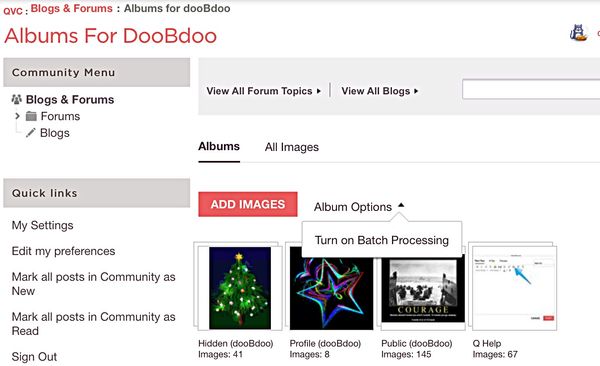
Or, you might want to look at batch processing. I'll provide basics, with some screen shots, and if you have more questions just ask... if I can't answer, I know someone can.
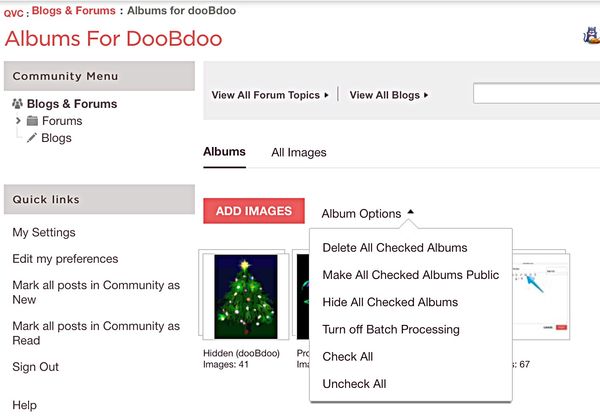
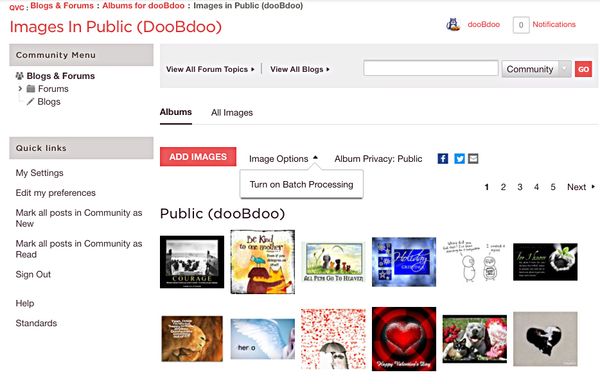
Just go to your images and take a look at the drop-down menu you'll see when you click/tap either "Album Options" or "Image Options." Choose "batch processing" first.
Then, click/tap again and you'll see your choices. We have the option of removing individual images, or several images, or pages of images, or even entire albums.
This is how it looks when I choose to see my albums, overall:
~~~~~~~~~~~~~~~~~~~~~~~~~~~~~
And this is an example of the options I see when I select my album titled "Public" and I want to edit within that album:
You also can select "All Images" to see everything in all your albums, and use the same drop-down menu options. I hope this helps.... I might not have explained it well. I don't keep many images here, but those who do might have other tips to offer. 🌻
07-30-2019 06:28 PM
One important reminder... when we remove images from our profile albums they also will vanish from the all the posts that contained links to those images (and that includes your avatar image).
Last time I looked, the image in the post or avatar was usually replaced by something like a red "x" in a box -- indicating a missing or broken link.
Example:
07-30-2019 07:25 PM
Thank you!
I’m going to give this a try!
*** AND printed your directions, just in case.



Get sneak previews of special offers & upcoming events delivered to your inbox.
*You're signing up to receive QVC promotional email.

Find recent orders, do a return or exchange, create a Wish List & more.





Privacy StatementGeneral Terms of Use
QVC is not responsible for the availability, content, security, policies, or practices of the above referenced third-party linked sites nor liable for statements, claims, opinions, or representations contained therein. QVC's Privacy Statement does not apply to these third-party web sites.
© 1995-2026 QVC, Inc. All rights reserved. | QVC, Q and the Q logo are registered service marks of ER Marks, Inc. 888-345-5788
