


Stay in Touch
Get sneak previews of special offers & upcoming events delivered to your inbox.

Sign in
 Blogs & Forums
 Forums
 Blogs
Blogs

09-02-2020 02:05 AM
Several weeks ago I opened my iPad and came here. The font was suddenly tiny tiny and has stayed that way. I've just been enlarging the page using the 'pinch' method but would really to get it to a decent size again.
I've tried going to preferences but that's not it. Can anyone tell me how to get it back to normal size? TIA
09-02-2020 06:11 AM
I am on my iPad using Safari and the font is now tiny for me too. But not too long ago the font was huge, 🤷♀️🤷♀️🤷♀️🤷♀️🤷♀️🤷♀️
I do not have any trouble with other sites, just here.
09-02-2020 10:31 AM
Me too. and the font cant be changed in settings either. Its so tiny you can barely read it.
09-02-2020 10:48 AM - edited 09-02-2020 10:49 AM
I use a tablet with Chrome & the tiny print is an ongoing problem BUT there was a nice & welcome break... when others complained about huge print it was finally normal size for me, now it's back to tiny again. I've tried all the recommended solutions to fix it but nothing works so I can only stay on this site for a brief time because I get a headache & my eyes hurt. Q is the only site with the tiny print problem & I've given up on the idea that their IT will fix it...ugh.
09-02-2020 11:02 AM
On a iPad with safari here. It straightened out for me.
I stumble into the app sometimes, which I don't like, and the only to clear that all out is to clean house entirely. Wonder if that would work for you?
09-02-2020 12:57 PM
I don't know anything about "i" devices never owned one. But, was going to say, I had a problem yesterday with my android chrome, but it got fixed later yesterday, but!!! As soon as I started this post, the problem is back. So much for that being fixed.
Nothing to do with font size, that is fine. On mine when you want to space between paragraphs, the keyboard disappears. So, have to go back up, touch the post again to get the keyboard back.
While typing sentences it's fine, spaces automatically. But when you want a new paragraph? Keyboard goes bye bye! Thought the had it fixed, did late last night, but now it's back again. They must be fooling with something. I might just run everything together and split paragraphs when I finish. Will save a pain in the a$$.
hckynut
09-02-2020 01:29 PM
@Bridgegal The last time IT diddled with the website, they did something that diminished the size of the font and there's nothing you can do to increase it but "pinch" it out.
I increase the size of the font to size 4 on easy post I write hoping it helps those with poor eyesight and me to read it. I wish everyone would do the same.
09-02-2020 01:58 PM - edited 09-02-2020 02:00 PM
I used the 4 font for a long time. It gradually kept getting smaller and smaller. So! I switched to the 5. My feeling this is, I think most here would prefer as opposed to having it too small. So I use 5.
hckynut
09-02-2020 03:03 PM
@hckynut I'm using an Android tablet and am having the same problem with spacing on paragraphs all of a sudden. Also the spell check is not working correctly. Normally you get a list of possible correct spellings but now it just flashes for a nanosecond, then disappears.
09-02-2020 03:25 PM - edited 09-02-2020 08:57 PM
@Bridgegal, @4kitties, @meem120, In addition to the pinch-to-zoom feature, or going into our Community profile Preferences, there are other options.😊
I think this one might do the trick for the recent change to the appearance of the Q forum.
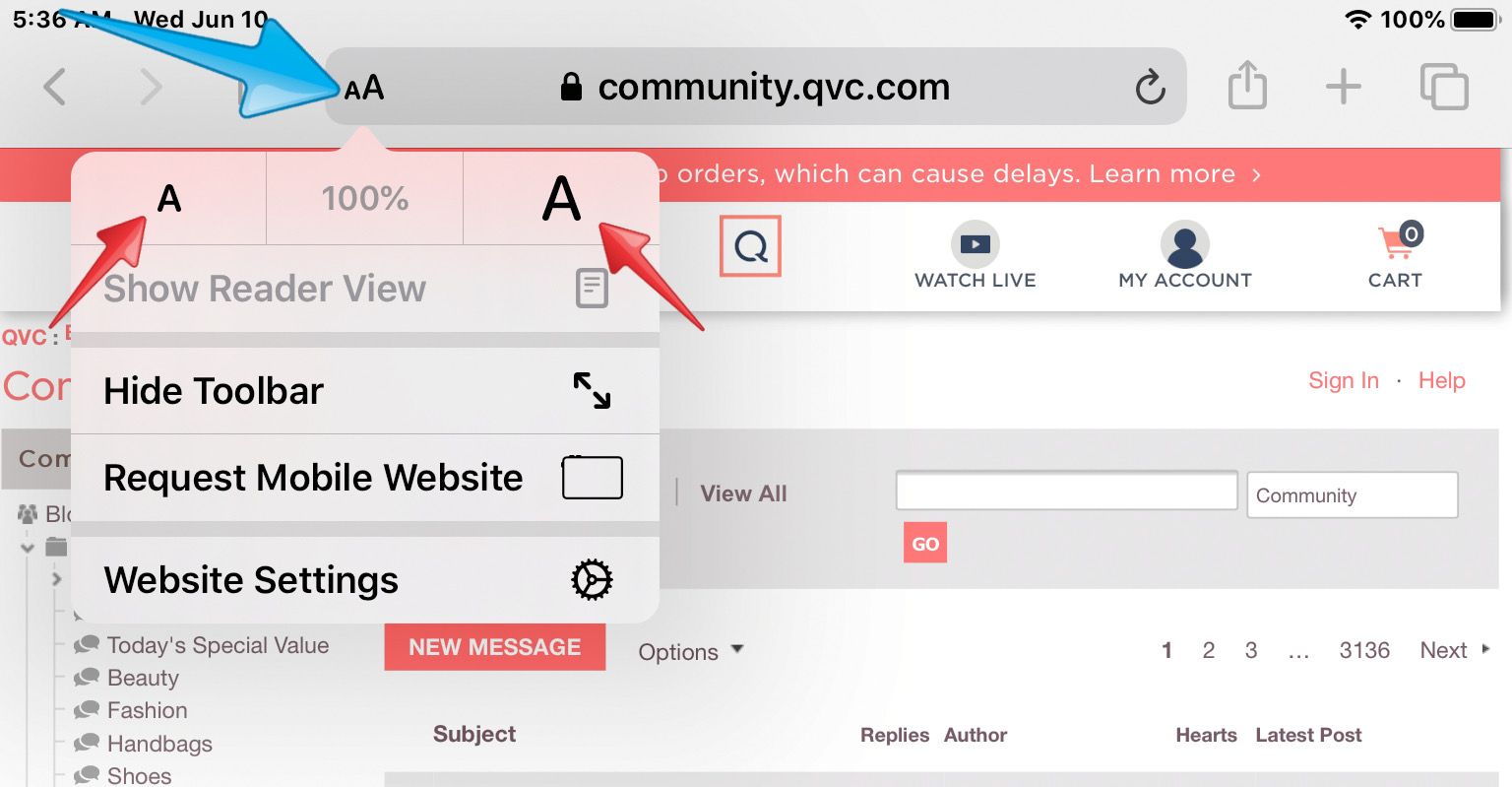
I noticed the Q site for some reason set the view to 85% on my iPad 6 and when I increased it to 100% it looked better.😊
Tap the AA icon on the left side of the Safari address bar to display the view menu.
Then tap the large A on the right to increase the size or the small A on the left to decrease.
You can tap the percentage in the center to return to the default size:



Get sneak previews of special offers & upcoming events delivered to your inbox.
*You're signing up to receive QVC promotional email.

Find recent orders, do a return or exchange, create a Wish List & more.





Privacy StatementGeneral Terms of Use
QVC is not responsible for the availability, content, security, policies, or practices of the above referenced third-party linked sites nor liable for statements, claims, opinions, or representations contained therein. QVC's Privacy Statement does not apply to these third-party web sites.
© 1995-2026 QVC Group, Inc. All rights reserved. | QVC, Q and the Q logo are registered service marks of ER Marks, Inc. 888-345-5788
