



Stay in Touch
Get sneak previews of special offers & upcoming events delivered to your inbox.

Sign in
 Blogs & Forums
 Forums
 Blogs
Blogs

07-03-2017 07:18 PM
How do I change my signature? I've clicked on Preferences, and it takes me to the threads I've participated in. Then I've clicked on Settings and everything else that I can find, and the signature isn't there either. I can't figure out what else to do. Thank you for your help.
07-03-2017 07:20 PM
My settings/personal information
07-03-2017 07:23 PM - edited 07-03-2017 07:55 PM
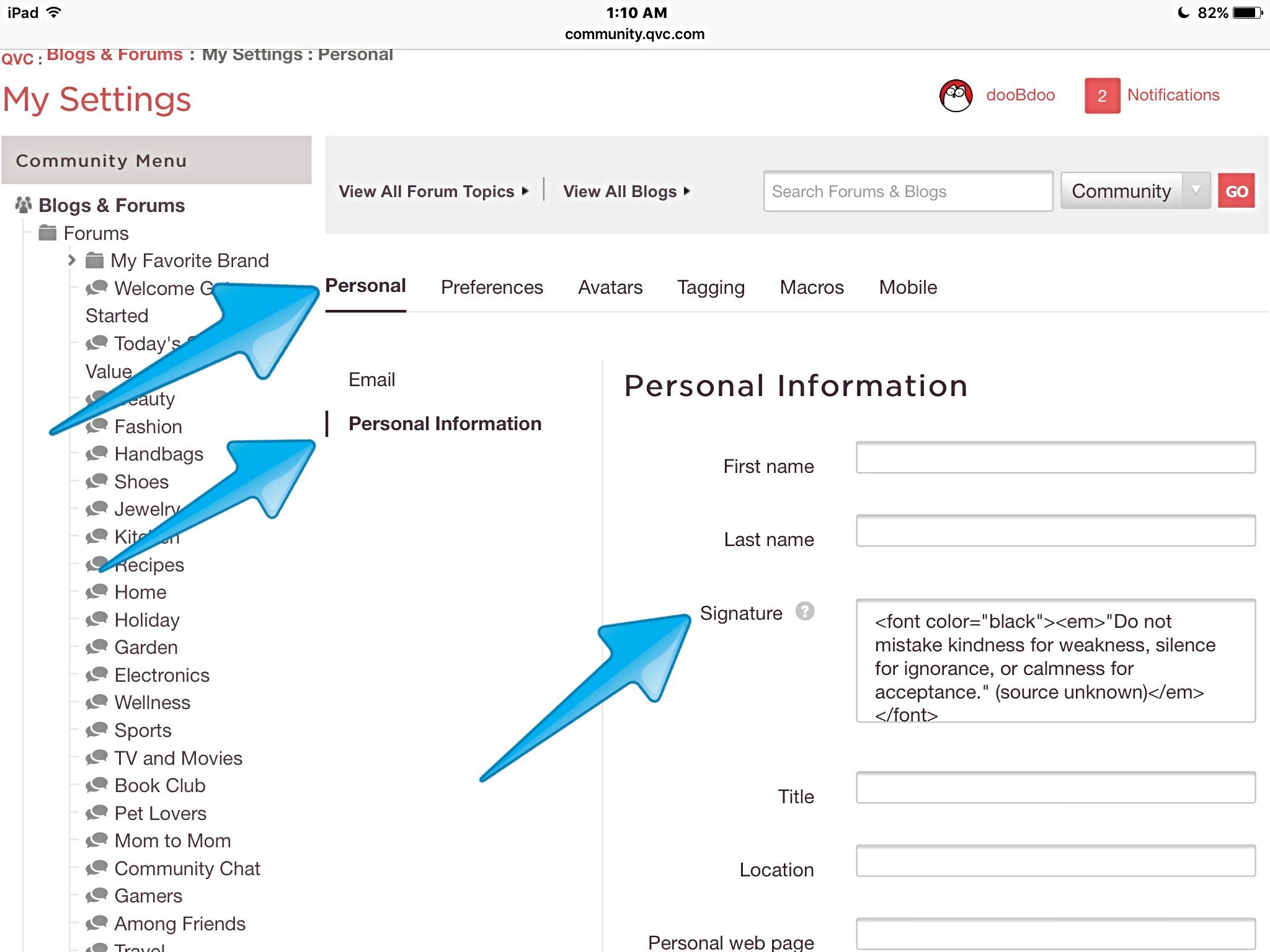
@NickNack, Under "My Settings," then under "Personal" click/tap the sub-category "Personal Information."
Be sure to click/tap "SAVE" after making your changes.
07-03-2017 07:25 PM
To italicize, precede the signature with <em> and end it with </em>.
If you want the signature in bold, precede it with <b> and add </b> at the end.
If you want to be creative with the siggy and add color, this is a copy of the instructions I've been posting since we moved to the new platform:
Precede the signature with
<font color="nameofcolor">
but don't use "nameofcolor" literally... fill in the color's actual name between those quotation marks. You can end with </font> but actually the system will fill that in for you.
Link to all the color names:
http://www.w3schools.com/colors/colors_names.asp
As an example, here's how I typed mine in with the HTML code (I chose to make the siggy a dark black and italicized).:
<font color="black"><em>"Do not mistake kindness for weakness, silence for ignorance, or calmness for acceptance." (source unknown)</em></font>
07-03-2017 07:41 PM
Haven't I seen this recently, it sure looks familiar. I am still thrilled you taught me how to do my siggy and emoticons. 
@dooBdoo wrote:
@NickNack, Under "My Settings," then under "Personal" click/tap "Personal Information."
Be sure to click/tap "SAVE" after making your changes.
07-03-2017 08:05 PM
07-03-2017 08:06 PM - edited 07-03-2017 08:07 PM
I must have not hit "Save." Will try again.
Edited to say: Hmm, I don't understand this. I did all the steps. I just wanted to add a cat quote under my dog quote.
07-03-2017 08:09 PM
Trying again. Sorry for all the tests.
07-03-2017 08:12 PM
I did all the codes that you told me to do @dooBdoo for the extra lines. I went back and checked to make sure they were correct, and they are. I give up. I don't want to delete the signature that I already have and start all over in case I can't get it back.
07-03-2017 08:16 PM - edited 07-03-2017 08:17 PM
NickNack wrote:I did all the codes that you told me to do @dooBdoo for the extra lines. I went back and checked to make sure they were correct, and they are. I give up. I don't want to delete the signature that I already have and start all over in case I can't get it back.
@NickNack, What's happening is that you've probably omitted a character, or perhaps added in a character that's incorrect, etc. The signature is programming code so it has to be done exactly correctly or we'll see problems. All it takes is one mistake to foul up the system translation of the code.
If you tell us specifically what you want the siggy to look like, or if you'll copy and paste exactly what you entered, one of us can help. I'm sorry you're having problems... I know it can be aggravating. I've been dealing with frequent power outages here, and I'm ready to pull my hair out. It's always something, isn't it?



Get sneak previews of special offers & upcoming events delivered to your inbox.
*You're signing up to receive QVC promotional email.

Find recent orders, do a return or exchange, create a Wish List & more.






Privacy StatementGeneral Terms of Use
QVC is not responsible for the availability, content, security, policies, or practices of the above referenced third-party linked sites nor liable for statements, claims, opinions, or representations contained therein. QVC's Privacy Statement does not apply to these third-party web sites.
© 1995-2026 QVC Group, Inc. All rights reserved. | QVC, Q and the Q logo are registered service marks of ER Marks, Inc. 888-345-5788
