



Stay in Touch
Get sneak previews of special offers & upcoming events delivered to your inbox.

Sign in
 Blogs & Forums
 Forums
 Blogs
Blogs

03-08-2025 05:04 PM - edited 03-08-2025 05:14 PM
😊 @smoochy, @rms1954, @Desertdi,
Here's some siggy "how to" I've been sharing for years... might be of use to repeat in case some posters aren't sure "how to".
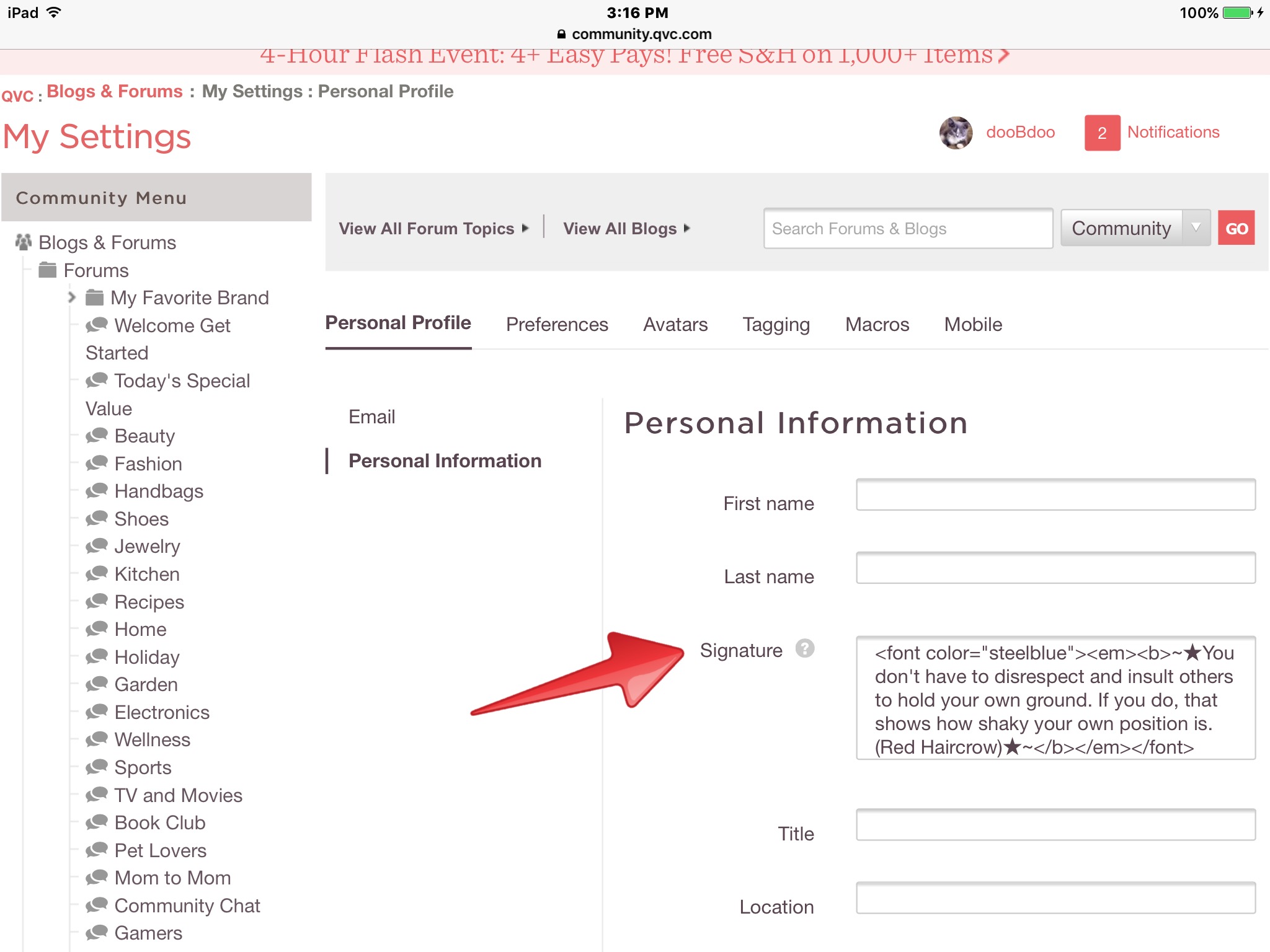
To add a siggy, on the left side of the Community under "Quick links" choose "My Settings" or "Edit my preferences."
Look under "Personal" and under that "Personal Information." (This screenshot is old so it displays my older siggy.)
______________________________________________
If you want to help the siggy stand out, there are many formatting options.
To italicize, precede the signature with <em> and end it with </em>.
If you want the signature in bold, precede it with <b> and add </b> at the end.
If you want to be creative with the siggy and add color, this is a copy of the instructions I've been posting since we moved to the new platform:
Precede the signature with
<font color="nameofcolor">
but don't use "nameofcolor" literally... fill in the color's actual name between those quotation marks.
You can end with </font> but actually the system will fill that in for you.
Copy and paste this
in your browser to see all the color names and codes
(this is not a live link --
live links are not permitted on the Community --
so you can't click/tap it to navigate there):
"w3schools.com/colors/colors_names.asp"
As an example,
here's how I typed my current siggy with HTML code
(I chose to make it a cadet blue, bold, and italicized).:
<font color="cadetblue"><em><b>Few things reveal your intellect and your generosity of spirit—the parallel powers of your heart and mind—better than how you give feedback.~Maria Popova</b></em></font>
Have a lovely, peaceful afternoon/evening, everyone!❤️
03-08-2025 05:50 PM
woo hoo got it 👍
03-08-2025 05:56 PM
@dooBdoo Wow, is that ever complicated! I would've never in a million years figured that out. haha
Thanks so much! I'll try it out tomorrow morning after I've had a couple shots of caffeine.
03-08-2025 06:21 PM - edited 03-09-2025 12:28 AM
@smoochy and @GingerHead, You're welcome!☺️
@smoochy, You did great! But then, I knew you would!❤️
@GingerHead, I've spent my life working in IT with code, computers, etc., so sometimes what comes fairly easily to me (and other posters with a similar background) might look awfully complicated.... but I hope it's really not quite so complex looking at it in steps.🌻
I tried to break it down in those separate steps, and I think (I hope!😘) after you do it one time you'll see it's not too bad.
I know you can do it!❤️ (btw: If you like someone else's siggy you always could ask them for a copy of what's in their settings and then you could substitute any quote, color, etc., you'd like to use.)
Just give a shout if you have problems and someone here will help out -- we have a great group of posters always willing to lend a hand.😊
03-08-2025 09:15 PM
Thanks again for your help and for your words of encouragement! 
03-08-2025 11:12 PM
03-09-2025 04:01 AM
@dooBdoo - thanks for the refresher. I did my siggy so long ago that any html knowledge I once had is a distant memory. 😂



Get sneak previews of special offers & upcoming events delivered to your inbox.
*You're signing up to receive QVC promotional email.

Find recent orders, do a return or exchange, create a Wish List & more.






Privacy StatementGeneral Terms of Use
QVC is not responsible for the availability, content, security, policies, or practices of the above referenced third-party linked sites nor liable for statements, claims, opinions, or representations contained therein. QVC's Privacy Statement does not apply to these third-party web sites.
© 1995-2026 QVC Group, Inc. All rights reserved. | QVC, Q and the Q logo are registered service marks of ER Marks, Inc. 888-345-5788
