


Stay in Touch
Get sneak previews of special offers & upcoming events delivered to your inbox.

Sign in
 Blogs & Forums
 Forums
 Blogs
Blogs

04-18-2017 11:08 PM
I somehow deleted my QVC Community icon. I can't seem to figure out how to find it again. I can save my sign in page but it's not as tidy as having the icon. I still have the icon that takes me into shopping site. Not an earth shattering problem but it bugs me
04-19-2017 03:55 AM
Hi @yock,
Here is how I change my avatar. I click on my present Avatar or my screen name " hckynut". That takes me to my personal home page.
When I get there I scroll way down, while looking at the Left Column. After so far down you will see "edit preferences". Click on that and look for "change avatar, and browse". Choose "browse" if you want to upload your own picture from your files. Gotta know where to find the folder with your picture file.
From there follow the step by step instructions and you should be ok. Hey, let me know if you need more help. Maybe others here do it differently, but this is fast and easy for me and I have done in several times.
Hope all is well with you and yours,
hckynut(john)
04-19-2017 10:17 AM
Good to see you, John.
Im trying to retrieve the QVC community sign in icon not the avatar. I have a square with a q in it to sign in to QVC shopping and for years I had a square with a q of another color for the community page. I'd just click on that and it would take me to sign in. Have no idea how I lost it. Just liked the looks of it.
Thanks for your response.
04-19-2017 11:41 AM
@yock wrote:Good to see you, John.
Im trying to retrieve the QVC community sign in icon not the avatar. I have a square with a q in it to sign in to QVC shopping and for years I had a square with a q of another color for the community page. I'd just click on that and it would take me to sign in. Have no idea how I lost it. Just liked the looks of it.
Thanks for your response.
Yesterday when I hit the "sign in "words", it directed me to a different URL site. Then I had to repeat hitting the same words to get to the forums.
I don't close or sign out from these forums, so I never use the QVC icon. If you don't have any activity when you are signed in, it automatically signs you out. Too soon for me at times. When I type an unusually long thought out reply post, by the time I hit "post", I have to go back and "sign in" again before it with take my post. At times it seems like less than 5 minutes, and in my opinion, that is too soon to automatically be signed out.
That's the way I get to the forums, and since it directed me to another URL yesterday, maybe that icon no longer works. I have never used the icon on this tablet, and on my computer I just use my forum "bookmark" when using the Firefox browser and "favorites" when using Internet Explorer Browser.
Best I can do for you.
hckynut(john)
04-19-2017 02:56 PM
Thanks, John. I agree about the frequency of sign ins.
04-20-2017 01:55 PM - edited 04-20-2017 01:58 PM
Hi, @yock! I'm sorry you're having problems. The issue of having to sign in too often... sometimes that can be fixed by clearing browser cookies/cache/website data, quitting the browser, and relaunching it, on a regular basis. On an iPad or iPhone, disabling background app refresh will help. It will be easier for us to offer advice if you'll tell us what kind of device you're using, and if you're on a computer whether it's Apple or Windows and which browser you use. There are some really knowledgeable, helpful posters here and I know someone can provide specifics once they know what you're using.
04-20-2017 05:28 PM
Thanks for reply. I'm using an ipad
I've had two icons on my home page for a long time. The one is a red square with a q in it that takes me to the shopping site. The other wAs a green square with a q in it titled community.qvc.com They sat side by side on my home page. The screen was so much cleaner looking with these shortcuts rather than with the page showing on home screen. I can't figure out what I did to lose it. Both of them functioned well.
the signing in part is the entering the password each time I leave the site. In the "old" days that sign in was good all day. It does bring up my email address when I enter. These are minor glitches but I just like my home page to look tidy.
04-20-2017 08:49 PM - edited 04-21-2017 07:08 AM
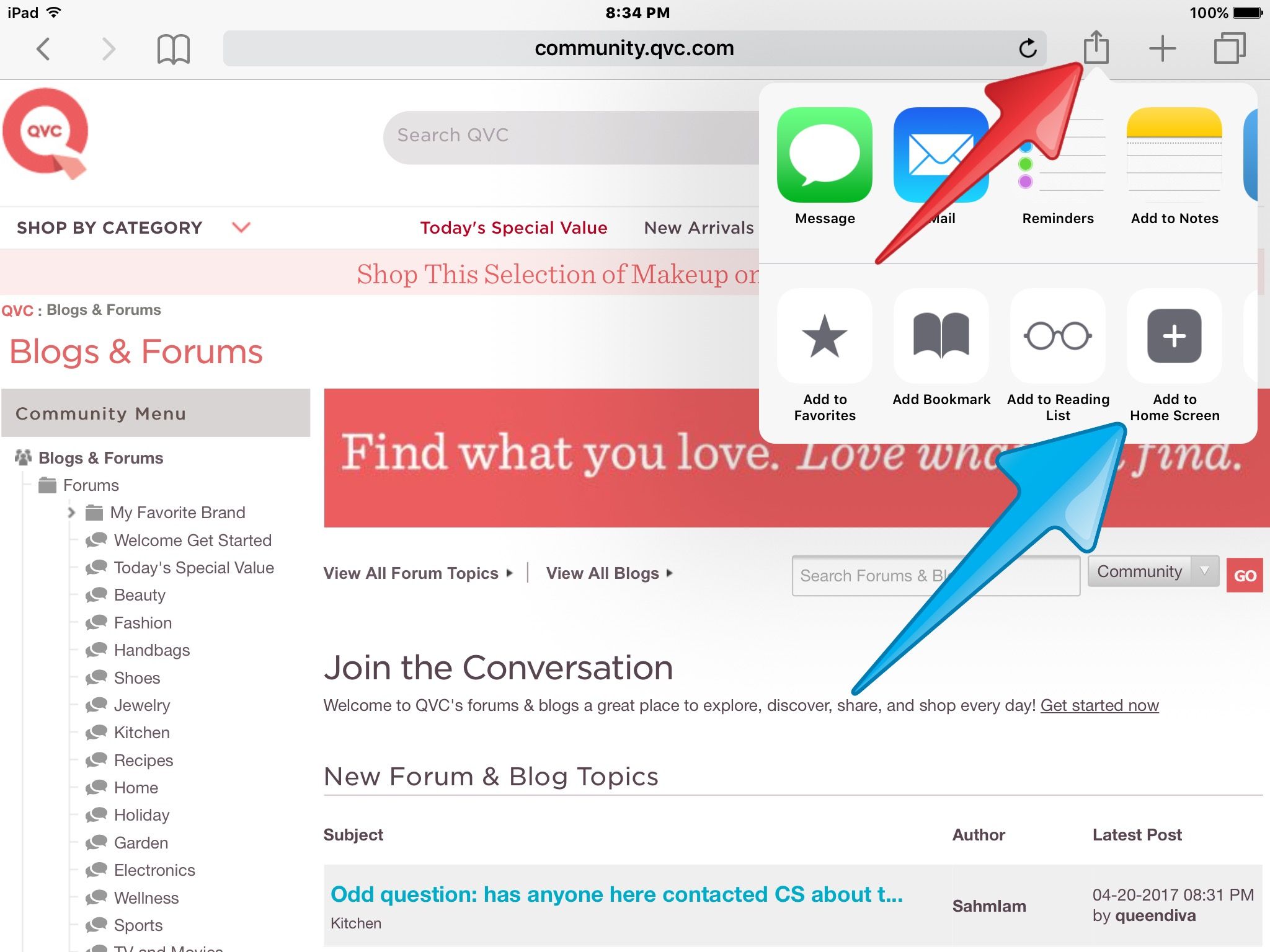
@yock, On an iPad (and iPhone) I think what you're describing is adding an icon to your home screen (the screen(s) you see after pressing the indented home button).
Open Safari, navigate to the page you want to see, and tap the "Share" icon (see red arrow in image). Then tap the "Add to Home Screen" (see blue arrow in image). This creates the icon... then you can go to your home screen(s) and you'll see it there. The image I'm using for this example is the Blogs & Forums home page at this link:
If you want to add an icon to your "Favorites" screen (the screen you see in Safari when you tap the plus sign to the right of the "Share" icon), just choose "Add to Favorites," edit the name if you want, then tap "Save."
04-20-2017 08:59 PM - edited 04-20-2017 09:07 PM
On an iPad or iPhone, to avoid being logged out so often:
1 -- Be sure to clear cookies, etc., on a regular basis.
Close all apps running in background (double tap the "home" button and swipe each app off the page to close the activity).
Go to Settings, Safari, and tap "Clear History and Website Data" and tap "Clear" when you see the popup.
Just below that, in Settings, Safari, tap the "Advanced" tab, then "Website Data," then "Remove All Website Data" and in the popup tap "Remove."
2 -- In "General" settings, tap "Background App Refresh" and disable it (it is enabled if the green button is showing). If this is enabled, it will cause us to have to login more frequently.
None of this will affect important stored info such as saved passwords, etc. It's perfectly safe. I never enable the background app refresh and I clear all Safari data at least once a day.
04-21-2017 09:43 PM
Thanks so much DooBdoo. My internet connection was lost for a few hours so finally was able to work on this. I do try to remember to clear sAfari each day and also clear my cookies.
I was was able to add the community page to the home pages and I thank you for that too. Couldn't find my green g again but at least I can easily click In Thanks for helping me out.
It it was a lot les stressful than trying to figure out why I had no internet connection. Was not my fault. I always think I clicked where I shouldn't have. Lol. Provider was down. Thanks again



Get sneak previews of special offers & upcoming events delivered to your inbox.
*You're signing up to receive QVC promotional email.

Find recent orders, do a return or exchange, create a Wish List & more.






Privacy StatementGeneral Terms of Use
QVC is not responsible for the availability, content, security, policies, or practices of the above referenced third-party linked sites nor liable for statements, claims, opinions, or representations contained therein. QVC's Privacy Statement does not apply to these third-party web sites.
© 1995-2026 QVC Group, Inc. All rights reserved. | QVC, Q and the Q logo are registered service marks of ER Marks, Inc. 888-345-5788
