






Stay in Touch
Get sneak previews of special offers & upcoming events delivered to your inbox.

Sign in
 Blogs & Forums
 Forums
 Blogs
Blogs

07-25-2023 03:46 PM
I am continually getting a message that my DISK IS FULL.
I do not store anything on my MacBook Air, so I do not know what the problem is -but I could eliminate IMovie as well as numbers, maybe a couple of others.
I did google the question and from what I understand I can eliminate those applications with out harm but....is this wise?
I KNOW that I will never want/use what I would eliminate, but just asking for advice before I do it.
thanks.
07-25-2023 04:17 PM - edited 07-28-2023 01:25 PM
@Mom2Dogs wrote:I am continually getting a message that my DISK IS FULL.
I do not store anything on my MacBook Air, so I do not know what the problem is -but I could eliminate IMovie as well as numbers, maybe a couple of others.
I did google the question and from what I understand I can eliminate those applications with out harm but....is this wise?
I KNOW that I will never want/use what I would eliminate, but just asking for advice before I do it.
thanks.
Try using CCleaner for Mac to clear out the unneeded files taking up room on your hard drive.
07-25-2023 05:55 PM
@Mom2Dogs Your topic & body message mention 2 different computers. Which one are you getting the "disk is full" message?
Like another poster mentioned, leave iMovie & Numbers alone. Both came pre-loaded & are not space hoggers.
How large is your HD & how much space is left?
Apple>About This Mac>More Info>General>Storage
Post the amount & we'll go from there.
Which OS are you using?
Apple>About This Mac>
"Never argue with a fool. Onlookers may not be able to tell the difference."
07-25-2023 06:32 PM
@Mom2Dogs. Maybe your idea of what's on a full disk is different from theirs?
07-25-2023 07:45 PM
@Mz iMac Thanks. The message of DISK IS FULL is on my MacBook Air V12.61/Monterey. 3.64GB available of 121.12GB.
Document folder shows 59.3 mb but the document folder is empty.
I do not use any of the applications like pages, keynote, numbers, etc.
I use the Macbook mostly for work - conversing with customers, taking orders and downloading attachments. I transfer the work information to a thumb drive, eventually those emails are trashed.
I do store photos but don't have that many not even close to 50 photos.
I go thru and trash emails on a regular basis. I do text with friends but also trash those conversations maybe monthly.
The trash is also emptied regularly.
I don't like to mess around to much with the Macbook air because I need it for work.
Any advise is appreciated.
07-25-2023 08:55 PM
@Mom2Dogs "3.64GB available of 121.12GB."
Good Grief!  Yes, you are running out/very low on space. Check your Downloads folder & delete everything you do not need or want. You can re-download if need be.
Your 50 or so photos could be very large. You must also have some music, video or music files somewhere on your drive.
If I were you, I would let an utility do all the work for me. You got a lot of stuff you need to get rid of & apparently you do not know where they are.
Check out this FREE utility called "OmniDiskSweeper" which is pretty easy & self explanatory. It will do the work for you. It will show you ALL your files, their sizes, where they are located & best of all you can delete right from the utility all at one time or separately. Go through all the files & delete all the ones you do not need want & most of all the files hogging up the most space. DO NOT DELETE ANY PRE-INSTALLED APPS
**READ THE DIRECTIONS**
Utility can be downloaded here: omnidisksweeper.en.softonic.com/mac
============================================
If you want to manually free up space, get comfortable on a full stomach & follow the directions in this Apple Knowledge Base Article:
Learn what to do if your Mac startup disk is almost full, or you don't have enough storage space to download, install, or copy.
Your Mac can show you how much storage space is being used by various categories of files, and how much space is available for additional files. As you take the steps in this article to free up storage space, this storage information updates automatically.
Your Mac can optimize storage by using iCloud to automatically make more storage space available when needed.* And you can use built-in utilities to quickly find and delete files, apps, books, movies, and other items that are taking up space, then delete items you no longer need.
If you have another storage device, such as an external drive connected to your Mac, you can move files to that device. Media files such as photos and videos can use a lot of storage space, so you can take steps such as these:
You can also delete files that you no longer need. For example:
If you don't want to delete certain files, you might be able to save space by compressing them. Then expand them when you need to use them again.
Did you empty the Trash? When you move a file to the Trash, its storage space doesn't become available until you empty the Trash.
** I removed all the links in the Article. However, you may need them. **
The article can be found here: support.apple.com/en-us/HT206996
******************************************
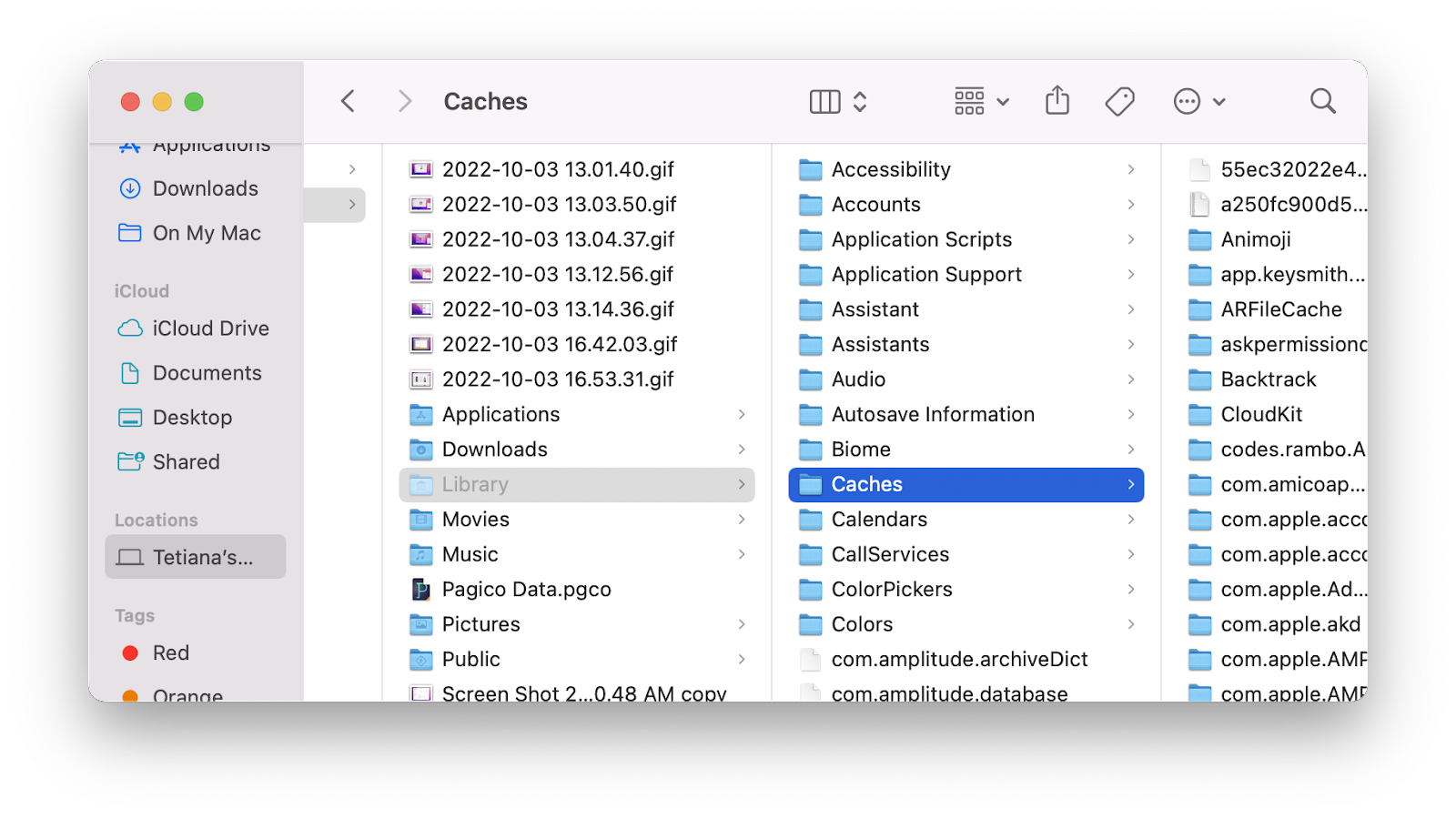
Deleting the Cache files
*************************************************
After doing any of the above suggestions when completely finished, run Disk First Aid & restart your computer. Empty Trash if full afterwards.
Disk Utility (found in the Dock & Utilities folder)>First Aid
OR
Run Disk Doctor which is an app found in the Utilities folder.
Restart your computer & empty trash if necessary.
Please post back your results.
Good Luck!
"Never argue with a fool. Onlookers may not be able to tell the difference."
07-25-2023 09:58 PM
@Mz iMac Oh boy!
I have never downloaded any music, or a podcast or a video...honestly I use this laptop for work mostly.
The document folder is empty. As you said, I don't know where all this information is that I seem to have.
As soon as I have time, hopefully this weekend, I will download the OmniDisk Sweeper....I don't feel comfortable enough to do the manual option.
I appreciate your advice and giving me the necessary links.
07-25-2023 10:11 PM
** Check your DOWNLOADS folder. **
Other than the utilityI recommended, DO NOT download anything else.
"Never argue with a fool. Onlookers may not be able to tell the difference."
07-26-2023 06:45 AM
07-26-2023 02:10 PM
I had time to work on my computer issue and went to the web site you provided...they do not take my credit card.
The software is free but insist on a credit card to verify me as well as my location. I messaged them on Facebook, fingers crossed that they reply.
thanks,



Get sneak previews of special offers & upcoming events delivered to your inbox.
*You're signing up to receive QVC promotional email.

Find recent orders, do a return or exchange, create a Wish List & more.





Privacy StatementGeneral Terms of Use
QVC is not responsible for the availability, content, security, policies, or practices of the above referenced third-party linked sites nor liable for statements, claims, opinions, or representations contained therein. QVC's Privacy Statement does not apply to these third-party web sites.
© 1995-2025 QVC, Inc. All rights reserved. | QVC, Q and the Q logo are registered service marks of ER Marks, Inc. 888-345-5788
