


Stay in Touch
Get sneak previews of special offers & upcoming events delivered to your inbox.

Sign in
 Blogs & Forums
 Forums
 Blogs
Blogs

08-19-2020 07:18 AM - edited 08-19-2020 02:23 PM
it may take some time for the image to load up - site can be slow
the image will pop up on your box and hit post
08-19-2020 07:25 AM - edited 08-19-2020 07:26 AM
most of my pics are from google and I particularly like gifs (movement)
so much fun - enjoy - and lmk if u have any questions -
I love seeing pics
08-19-2020 10:09 AM
With my pictures, I have to edit them as they are generally too large. So if you run into that problem, crop the picture and then insert. I load them from my phone, so you don't have to send them to your desktop. However you may have to make sure you change to the "full" version at the bottom by the sign in in order to get the icons. See screen shot.
08-19-2020 11:30 AM - edited 08-19-2020 11:31 AM
@Lindsays Grandma wrote:
@QPrincess wrote:If I have a picture on my phone - how do I post it to an online posting here?
I'd love to share a picture of what was in my package, received today, of a Women with Control denim jacket. I don't even know what this is!
@QPrincess ... I'm so glad you asked that question, I will learn right along with you on how to do that.
Go by the steps I posted to see if you can get a pic posted. Hope is easy to understand for others.
Looks like @Yahooey posted pics to the steps I posted on How to post a pic.
08-19-2020 11:33 AM
Sometimes I have to resize the pic too. If the small, medium large open does not work I resize in Adobe Photoshop.
If the pic is too large they will know since it will not post.
08-19-2020 11:36 AM
@QPrincess wrote:
@Nightowlz wrote:Click on the Insert/Edit icon above
Click Choose File, on left side find where your picture is posted on your desktop, in pictures etc. On right side find the picture, click on it, click on open, click Insert Image. HTH
I just save the pic to my desktop so it's easy to find before I start.
The picture is on my phone so I guess I need to send that to my desktop????
Yes. I don't know how else to get it there from your phone. I'm not a tech wiz but I can do some stuff. LOL!!!
If someone else knows of a way please post?
08-19-2020 11:46 AM
just trying
08-19-2020 11:47 AM
This was my Siberian 25 lb all meat no fat baby. He is playing on the rainbow bridge now
08-19-2020 11:51 AM
So happy this worked. It was a pic I had on my desktop.
08-19-2020 02:04 PM - edited 08-19-2020 04:31 PM
@QPrincess, @Nightowlz, @Lindsays Grandma,
to answer your question about uploading an image
directly from a mobile device (phone or tablet),
I'll add this to the great information
@Kachina624, @Yahooey, and @MamaWick
already shared.😊
I use an iPad (and sometimes an iPhone), so I don't know how this will look on other brands, but I hope this will give you the general steps to follow and the logic behind them.
On your phone or tablet:
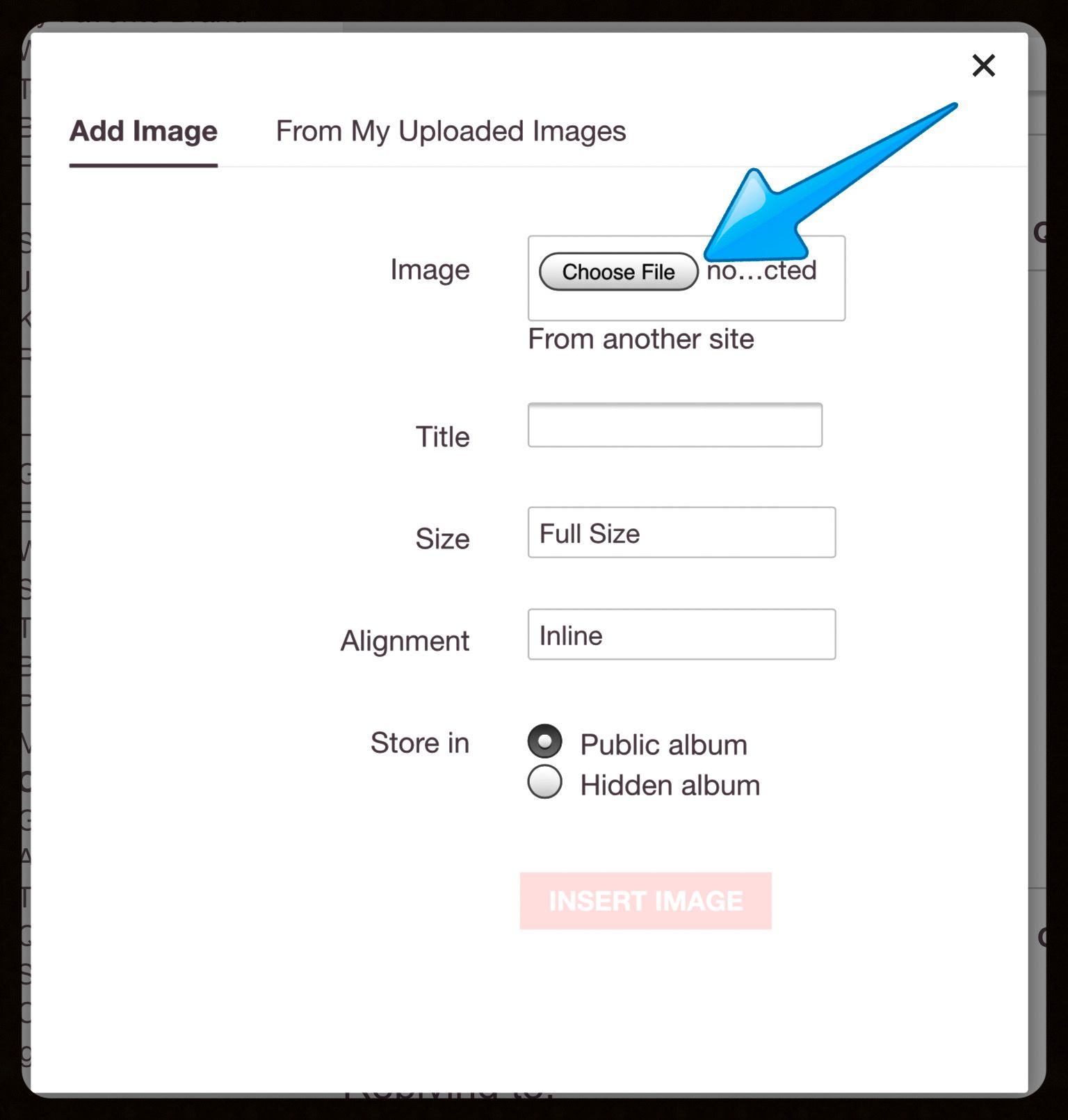
1 -- "Choose File" is asking for the location where you saved/stored your picture on your device.
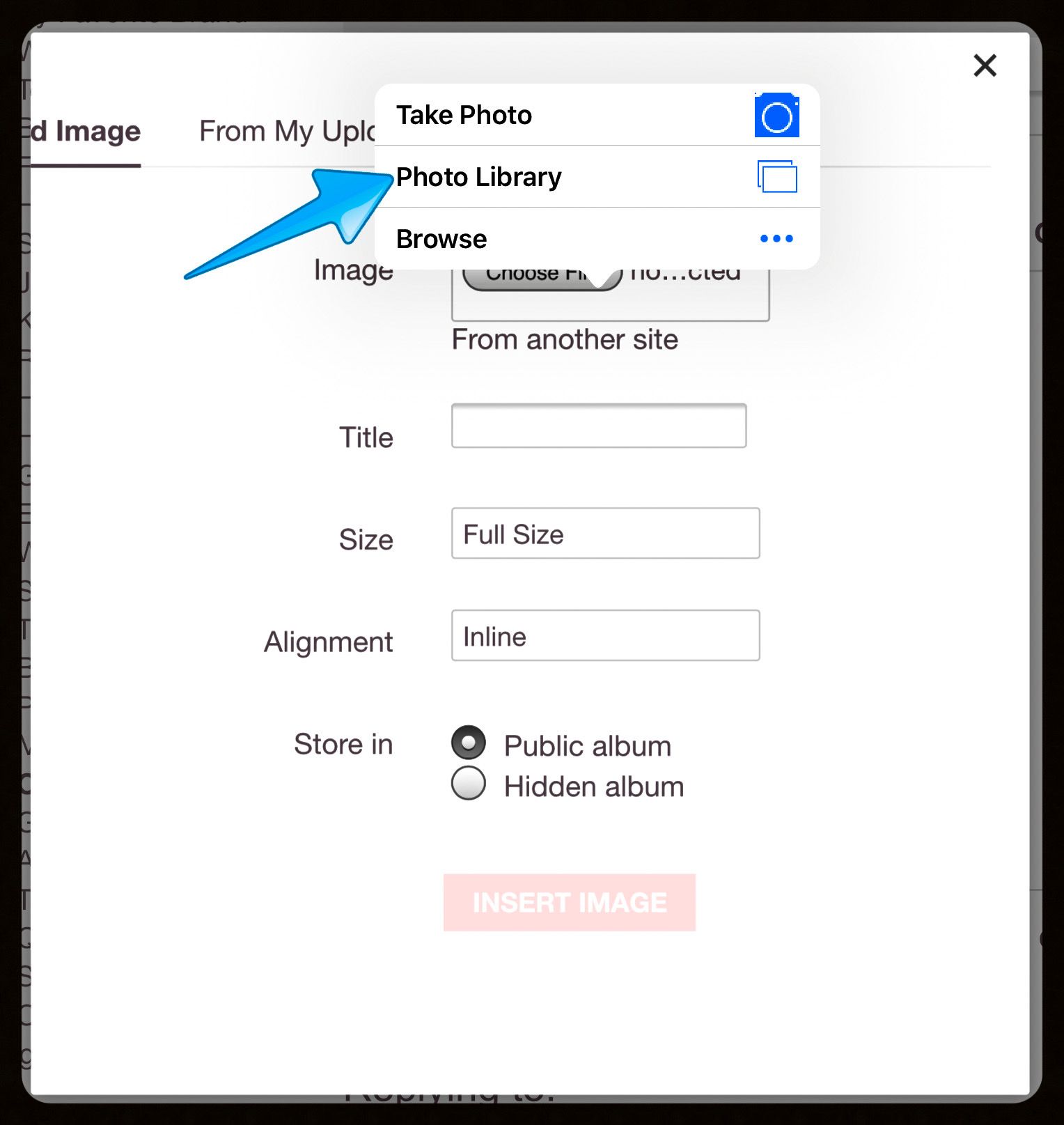
2 -- After you tapped/clicked "Choose File," the system will display locations where you might find images (also lets you take a new photo).
On my iPad, images are stored in the "Photo Library" so that's what I choose.
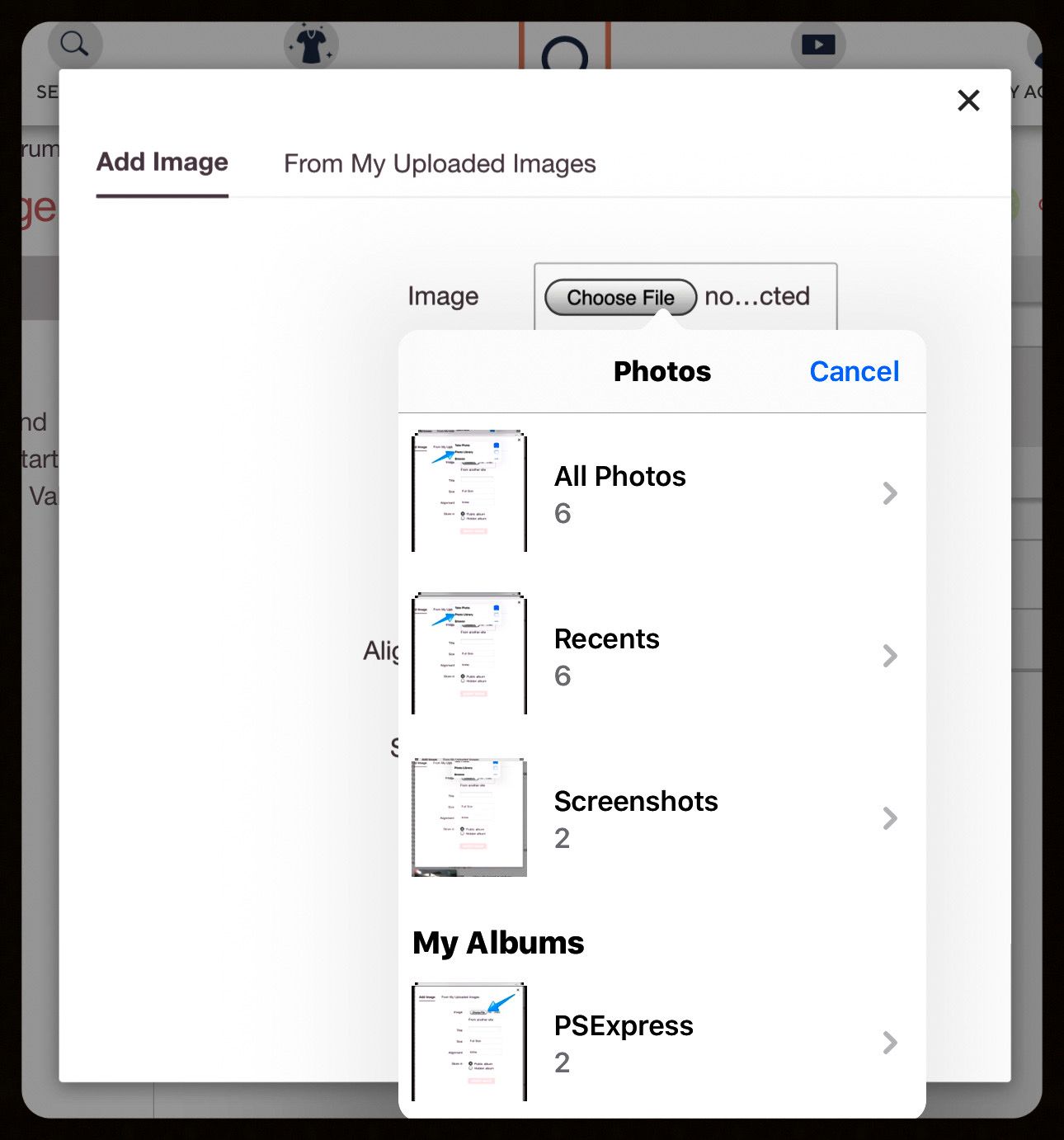
3 -- After I chose my Photo Library as my image location, I saw a choice of the albums currently on my device.
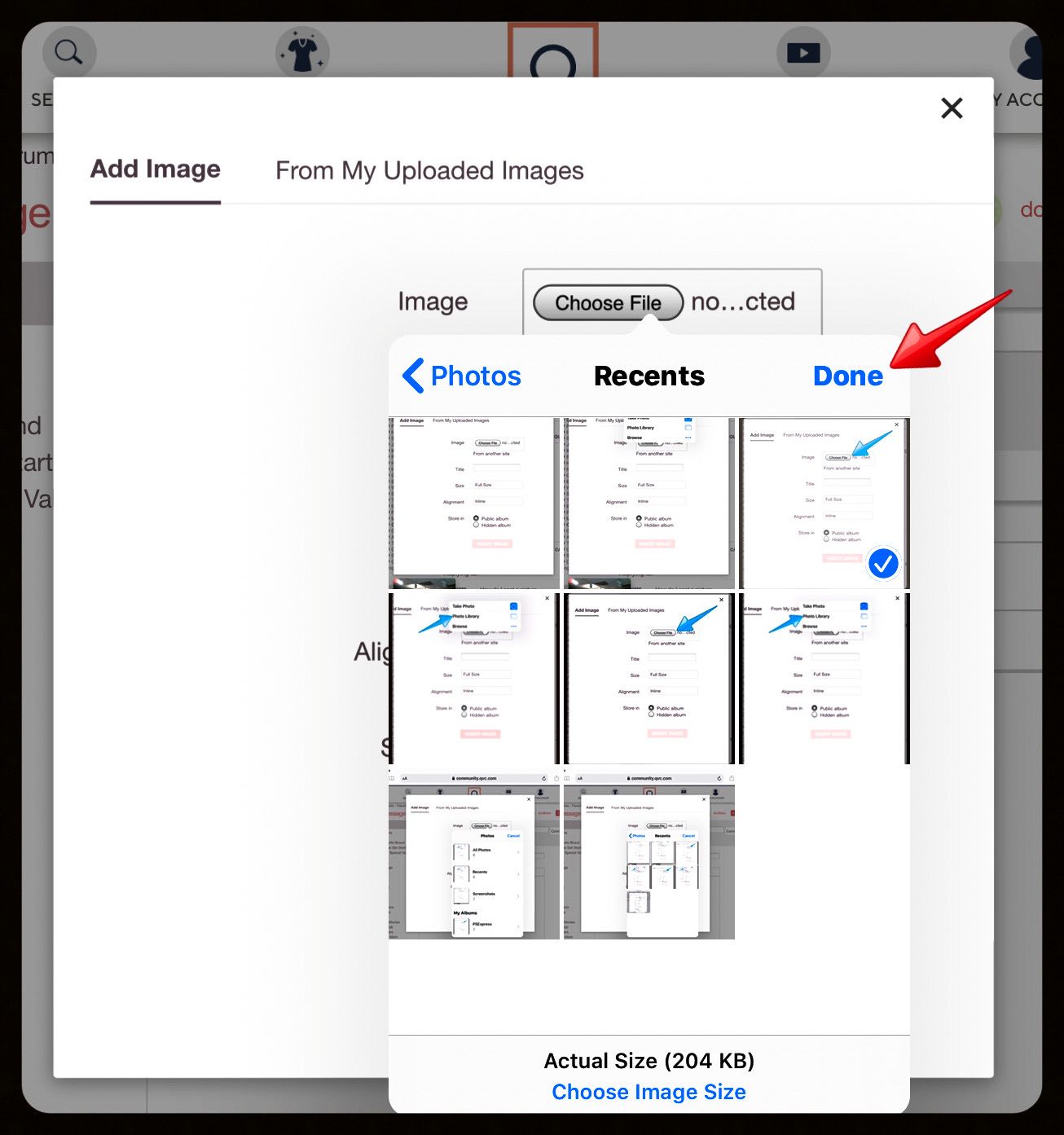
4 -- In this case, I tapped on "Recents" and the window displayed all of the images currently available in my "Recents" album.
I tapped on one of the pictures, and a check mark in a blue box appeared in the lower right corner of the chosen image.
Then, I tapped "Done."
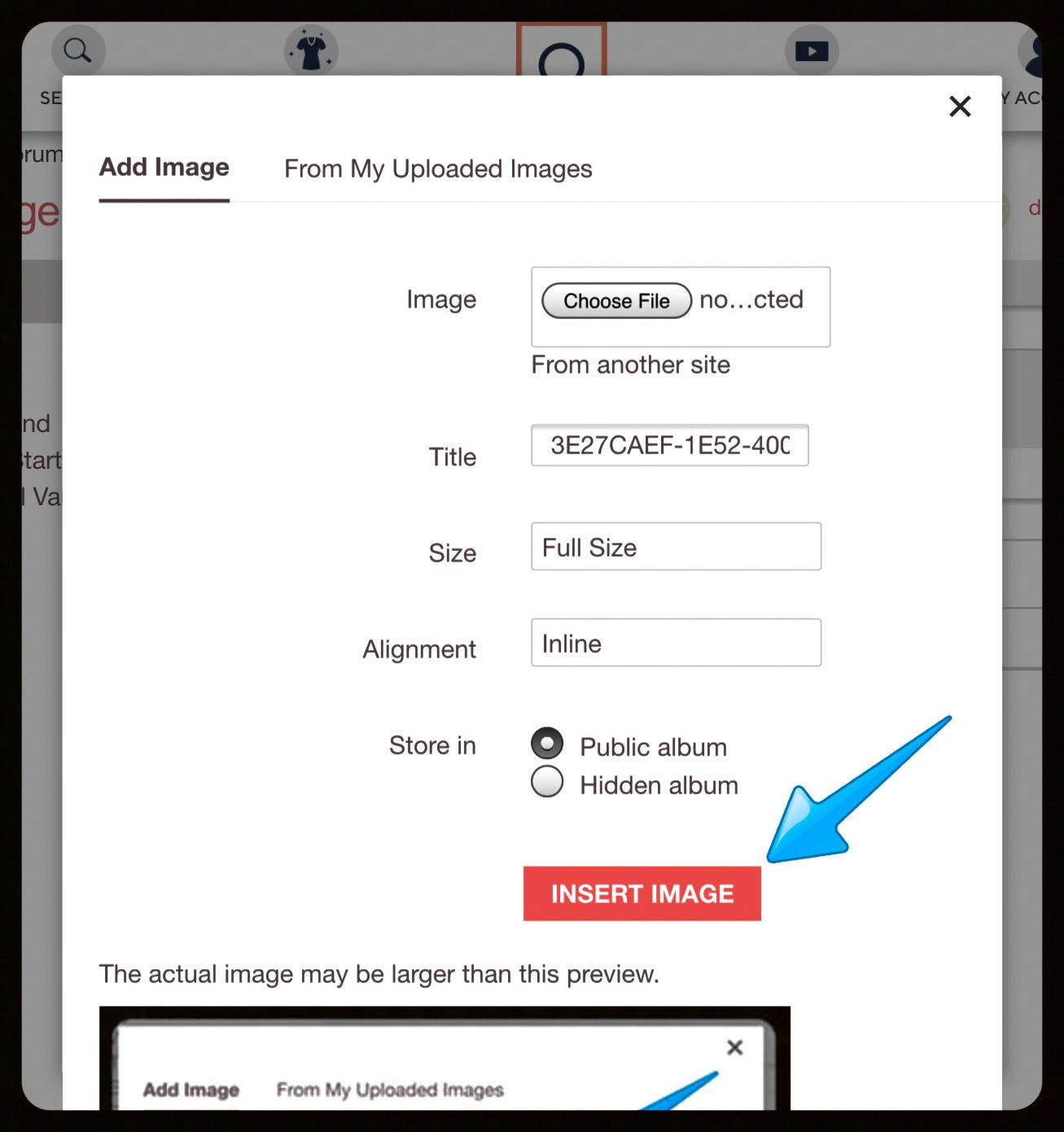
5 -- The Q site loaded the image. You'll see there are other options you can edit, such as the title, but you don't have to change any of them if you don't want to.
Be sure to tap/click "INSERT IMAGE."
The Q site will add the image to your album in your profile and also will add the pic in your reply dialogue box on the thread.
6 -- Then add any text you want and, as usual, tap/click "POST."
Hope this makes sense! Just keep asking questions, try out the process, play around with it. You always have the option of not posting the image, or removing it after you post, or even going to your profile albums and deleting there.
Happy posting, everyone!😊



Get sneak previews of special offers & upcoming events delivered to your inbox.
*You're signing up to receive QVC promotional email.

Find recent orders, do a return or exchange, create a Wish List & more.





Privacy StatementGeneral Terms of Use
QVC is not responsible for the availability, content, security, policies, or practices of the above referenced third-party linked sites nor liable for statements, claims, opinions, or representations contained therein. QVC's Privacy Statement does not apply to these third-party web sites.
© 1995-2026 QVC, Inc. All rights reserved. | QVC, Q and the Q logo are registered service marks of ER Marks, Inc. 888-345-5788
