


Stay in Touch
Get sneak previews of special offers & upcoming events delivered to your inbox.

Sign in
 Blogs & Forums
 Forums
 Blogs
Blogs

10-29-2022 04:45 PM
Hi Y'all: I was going to give my iPad to my elderly friend. Her children gave her the 2nd generation Ipad that they previously used.She forgot the email address and password. She has old photos on it and only uses it to play games. She doesn't want to do a factory reset. Then the family gave her another iPad that is maybe 5 years . She forgot the email and password. Son tried to help. Some issues not certain with both ipads. She prefers iPad but can't afford one and just wants something to send and receive emails and play games. She is 81. I have already done a factory reset on my ipad. They have tried to change the email address and password and received different error messages or whatever. What's the easiest way or if possible to set up my old iPad for her to use. I will start a notebook for her to have all the information written down for her. I hope someone can understand this and possibly help. Thanks y'all.
10-29-2022 05:11 PM
@SouthernBee wrote:Hi Y'all: I was going to give my iPad to my elderly friend. Her children gave her the 2nd generation Ipad that they previously used.She forgot the email address and password. She has old photos on it and only uses it to play games. She doesn't want to do a factory reset. Then the family gave her another iPad that is maybe 5 years . She forgot the email and password. Son tried to help. Some issues not certain with both ipads. She prefers iPad but can't afford one and just wants something to send and receive emails and play games. She is 81. I have already done a factory reset on my ipad. They have tried to change the email address and password and received different error messages or whatever. What's the easiest way or if possible to set up my old iPad for her to use. I will start a notebook for her to have all the information written down for her. I hope someone can understand this and possibly help. Thanks y'all.
@SouthernBee wrote:Hi Y'all: I was going to give my iPad to my elderly friend. Her children gave her the 2nd generation Ipad that they previously used.She forgot the email address and password. She has old photos on it and only uses it to play games. She doesn't want to do a factory reset. Then the family gave her another iPad that is maybe 5 years . She forgot the email and password. Son tried to help. Some issues not certain with both ipads. She prefers iPad but can't afford one and just wants something to send and receive emails and play games. She is 81. I have already done a factory reset on my ipad. They have tried to change the email address and password and received different error messages or whatever. What's the easiest way or if possible to set up my old iPad for her to use. I will start a notebook for her to have all the information written down for her. I hope someone can understand this and possibly help. Thanks y'all.
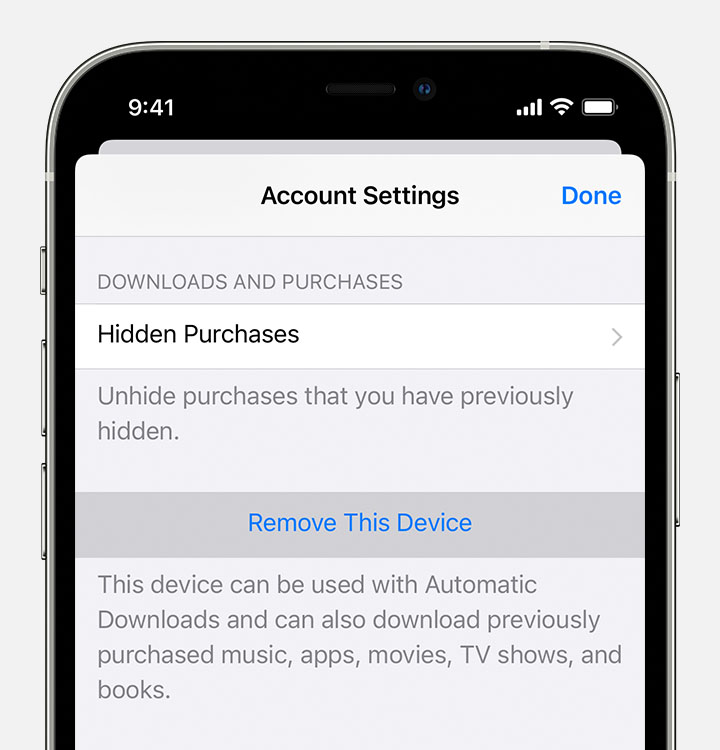
1. first you have to delete your iPad from your apple ID to make it usable for someone else
2. you need to have friend's apple ID and password to get that iPad up and running for her
3. possibly you could do a third apple id / password for her but sounds like a rabbit hole to me
10-29-2022 05:24 PM
@jackthebear : Its complicated but I think the son tried a 3rd apple id and got locked out. Sounded like he called Apple and since the iPad's are old really didn't help but stated to try again or something.
I have removed all my info from my iPad and the factory reset.I was afraid to use my name and try to set up a different apple id and create more problems.
10-29-2022 05:37 PM
you still have to take the old pad off your apple ID to give to someone, resetting and deleting is not the same , it is not hard to do,
but sounds like establishing and keeping a new apple ID is the issue, personally I wouldn't want to deal with it if she forgets again.
I would delete your iPad from your account and give it the friend so a family member can set it up for her
10-29-2022 05:52 PM - edited 10-29-2022 06:08 PM
How about solving one problem first, and that is when she gets another iPad, or you manage to get it wiped, right then decide what the user code/password is going to be before anything else is done, and write it down, so somebody else in the family has it.
I am much younger, and I don't trust my memory at all. I have all my passwords written down just in case for an emergency, my family needs to have them.
10-29-2022 05:55 PM
@jackthebear : My name has already been removed from the ipad.
10-29-2022 06:06 PM
@Bhvbum : Totally agree and understand. I have a notebook with all my info.When I visited my friend- I had a note book with her name and was writing everything down. She didn't tell me until the visit about the id and password issue.
10-29-2022 06:12 PM
@SouthernBee wrote:@Bhvbum : Totally agree and understand. I have a notebook with all my info.When I visited my friend- I had a note book with her name and was writing everything down. She didn't tell me until the visit about the id and password issue.
Once, yes, happens to all of us, but the same thing again for the next iPad? Twice?
10-29-2022 08:50 PM
@SouthernBee wrote:@jackthebear : My name has already been removed from the ipad.
But have you removed the device from your account?
10-29-2022 08:56 PM
@Ainhisg wrote:
@SouthernBee wrote:@jackthebear : My name has already been removed from the ipad.
But have you removed the device from your account?
@Ainhisg : I am so frustrated and confused. I don't know.



Get sneak previews of special offers & upcoming events delivered to your inbox.
*You're signing up to receive QVC promotional email.

Find recent orders, do a return or exchange, create a Wish List & more.





Privacy StatementGeneral Terms of Use
QVC is not responsible for the availability, content, security, policies, or practices of the above referenced third-party linked sites nor liable for statements, claims, opinions, or representations contained therein. QVC's Privacy Statement does not apply to these third-party web sites.
© 1995-2026 QVC Group, Inc. All rights reserved. | QVC, Q and the Q logo are registered service marks of ER Marks, Inc. 888-345-5788
