





Stay in Touch
Get sneak previews of special offers & upcoming events delivered to your inbox.

Sign in
 Blogs & Forums
 Forums
 Blogs
Blogs

06-30-2021 12:16 PM
I post ONE image and sometimes not even one and get this message:
You have reached the limit on images. You must delete at least one image before you can upload any more.
06-30-2021 12:42 PM - edited 06-30-2021 12:44 PM
Ive never gotten that message and I have dozens and dozens on file, maybe hundreds.
I just looked, I have 1203. How many do you have?
06-30-2021 12:52 PM - edited 06-30-2021 02:53 PM
@CherryHugs, The site has a limit on the number of images we can store in our albums, so that message indicates that you need to delete some pix from your album(s).
Click/tap on your nickname or profile.
Then, on the left side of the page
under "My Images"
click/tap "View Images for [yournickname]."
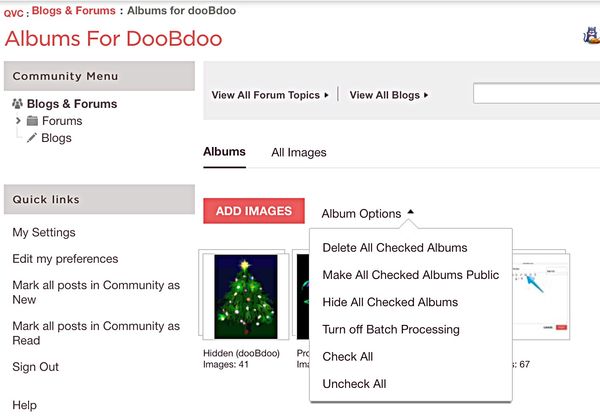
You can delete individual images or you can use "batch processing" to delete multiples.
This will remove the images from the posts they were displayed in (it breaks the link between the album and the thread/post), so you'll probably see a box with an "x" in it in those posts after you delete the pix from the album(s).
Here's an example of what we sometimes see when an image has been deleted from the poster's album(s):
I hope this helps! If you need more details, give a shout and I can add steps and maybe screenshots.
Take care, everyone.😊
06-30-2021 12:53 PM
Sometimes I get the oddest messages out here. There's one about posting too many times, when I've only hit POST once.
07-01-2021 11:23 AM - edited 07-01-2021 11:31 AM
@dooBdoo WOW thank you so much. I had no idea about this.
I checked and have about 4,983!
Thank you for telling me
this and I will know next time! 

Wow this is gonna take a long time to delete a bunch. It wont let me do the batch only one at a time grrrr~
07-01-2021 11:53 AM - edited 07-01-2021 11:58 AM
Its even showing others images they have shared on my list which is nuts lol. I have 165 pages to go thru and delete each pic one by one. 
07-01-2021 12:20 PM
@CherryHugs, I'm glad it helped! You should be able to use batch processing to delete more than one at a time... here's a copy of something I posted a couple of years ago which might be of help:
~~~~~~~~~~~~~~~~~~~~
You might want to look at batch processing. I'll provide basics, with some screen shots, and if you have more questions just ask... if I can't answer, I know someone on the forums can.😊
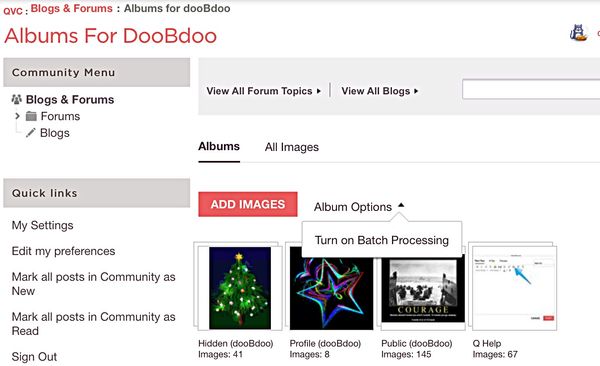
Just go to your images and take a look at the drop-down menu you'll see when you click/tap either "Album Options" or "Image Options." Choose "batch processing" first.
Then, click/tap again and you'll see your choices. We have the option of removing individual images, or several images, or pages of images, or even entire albums.
This is how it looks when I choose to see my albums, overall:
~~~~~~~~~~~~~~~~~~~~~~~~~~~~~
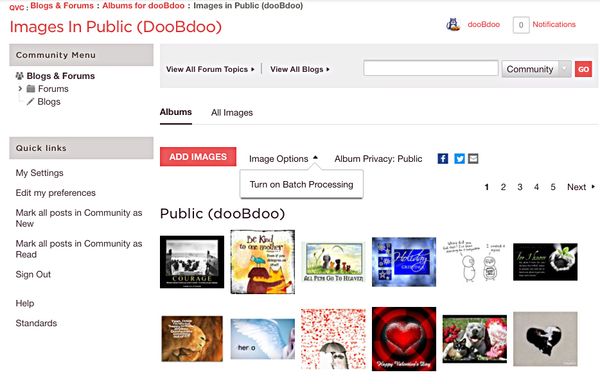
And this is an example of the options I see when I select my album titled "Public" and I want to edit within that album:
You also can select "All Images" to see everything in all your albums, and use the same drop-down menu options. I hope this helps.... I might not have explained it well. I don't keep many images here, but those who do might have other tips to offer. 🌻
07-01-2021 12:23 PM
I'm confused. Some of these public images shiwn I have never posted on the QVC forums. If I delete them, are they then deleted from my FB page?
07-01-2021 12:48 PM - edited 07-01-2021 01:21 PM
@MamaWick wrote:I'm confused. Some of these public images shiwn I have never posted on the QVC forums. If I delete them, are they then deleted from my FB page?
@MamaWick, You can look directly below an image in an album to see when it was uploaded.
Below the upload information you'll see
"Posted in:"
followed by the thread/post title
(which is a hyperlink so you can click/tap it and go directly to that post)
and the date/time it was posted.
If there's no "Posted in:" info that means the image isn't linked to any thread/post.
If we delete an image from an album, it also will be deleted from the thread/post.
Images we upload to the Q albums aren't linked to Facebook.
I hope that helps, and hope you're having a lovely day!😊
07-01-2021 01:37 PM - edited 07-01-2021 01:37 PM
@dooBdoo Thank you again so very very much for this information. You explained things perfectly and its so helpful.
What happened when I tried to delete all checked by batch, I was impatient and didnt wait long enough.
This time I did it again and just did other things and looked later and they are all deleted. So much
better than deleting one by one LOL. Its already letting me post some pics here.
I had no idea we needed to delete images and now I can be sure to do that once in a while.



Get sneak previews of special offers & upcoming events delivered to your inbox.
*You're signing up to receive QVC promotional email.

Find recent orders, do a return or exchange, create a Wish List & more.





Privacy StatementGeneral Terms of Use
QVC is not responsible for the availability, content, security, policies, or practices of the above referenced third-party linked sites nor liable for statements, claims, opinions, or representations contained therein. QVC's Privacy Statement does not apply to these third-party web sites.
© 1995-2026 QVC Group, Inc. All rights reserved. | QVC, Q and the Q logo are registered service marks of ER Marks, Inc. 888-345-5788
